

Introduction #
ICMP tunneling is a method of encapsulating network packets (or any data really) inside the ICMP packet itself. I first heard of this method at the Internet Networks course at the University. It instantly intrigued me because this method allows potential malicious actors to bypass network restrictions set by the system administrators. As I researched more about it, I found out that it can be used for data exfiltration and C2 (command-and-control) attacks, tho, recently, advancements made in the firewall software have made this method harder to pull off. Either way, as I was looking for a project that includes network programming, this was a perfect thing to look into.
Design #
The goal of this software is to route traffic filtered by the firewall through the tunnel and access the Internet from a machine that does not have access to it.

If you look closer into this illustration, it should be easy to recognize the problems that we have to solve:
- How to route the traffic from the client PC inner processes to the process that encapsulates it and sends it through a tunnel?
- How to extract the original traffic on the server and route it to its original destination but in a way that the responses from the destination are routed back to the client?
- How to extract response traffic on the client from the tunnel and route it to its original sender?
I designed the solution in such a way to separate responsibility between encapsulating traffic and sending it through the tunnel and receiving the encapsulated traffic from the tunnel, extracting it, and forwarding it to the original source/desitnation. Considering that the client/server roles have the same requirement of encapsulating/extracting the traffic, and the only difference between them is routing configuration I decided to separate these two roles with the flag which is passed to the program as an input argument.
Implementation #
ICMP #
First, a short explanation of the ICMP itself. ICMP (Internet Control Message Protocol) is a OSI layer 3 protocol, defined in RFC 792 used for network diagnostics and debugging. There are 9 different ICMP message types, but for this particular solution echo message type is used.

The data field has no limitations to its length and it’s not subverted to basic firewall checks, which makes it a perfect place to put users data/packets that they want to tunnel.
Technologies #
When I started working on this project, somewhat logically, I chose C as the programming language for my solution. I had some experience with it from secondary school and programming some simple programs for ESP32 based microcontrollers. Unfortunately, when I started, besides having to learn and explore how ICMP tunneling works and the ways to implement it, I had to relearn C and I haven’t had time for that. In the end, I chose Python as my favorite “Just make it work” language. Of course, this decision comes with a big hit to performance, but the focus of this project is to learn and demonstrate how this method works and not to create the most performant solution.
Client subsystem #
Routing traffic to the client subsystem to encapsulate it into ICMP
Firstly, I needed a way to route traffic from the other processes on the client PC to the software subsystem which encapsulates the traffic into an ICMP tunnel. Libraries like Scapy could not satisfy my need, as they can’t directly manipulate packets from the kernel but just register it and create a copy of them to modify. While looking for a adequate solution I stumbled upon TUN/TAP interfaces in Linux. TUN/TAP interfaces are virtual network devices that operate on the network/IP layer (TUN) and data link/ethernet layer (TAP). With the Linux built in tools, I have created a TUN interface to which all the traffic from the client PC will be redirected. My software will then bind and read from the said interface and modify and encapsulate the traffic.
ip tuntap add name tun0b mode tun               # Create TUN interface with the name tun0b
ip link set tun0b up                            # Enable TUN interface
ip addr add 10.0.0.2 peer 10.0.0.1 dev tun0b    # Set clients IP on the TUN interface, and define TUN interfaces IP as only one node
ip route add default via 10.0.0.1 dev tun0b     # Create default route which sends all traffic to the TUN interface
Receiving traffic from the client processes, ICMP encapsulation and forwaring to the tunnel
Receiving the traffic from the TUN interface is done in a few lines of code using the pytuntap library. One daemon thread is listening on the TUN interface and reading from it. Buffer read from the TUN interface is encapsulated as ICMP using a custom made ICMPPacket class which implements all needed features for the ICMP echo/echo reply packets. Finally, using raw sockets, the software sends the ICMP packet to the server whose address it got from the input arguments.
def wrap_into_icmp(self, stop_event: Event) -> None:
    while not stop_event.is_set():
        buffer = self.tun.read()
        if buffer:
            icmp_packet = ICMPPacket( self.destination, self.mode == Modes.SERVER )
            icmp_packet.payload = buffer
            self.icmp_socket.sendto( icmp_packet.get_raw(), ( self.destination, 1001 ) )
Receiving traffic from the tunnel, extracing it and forwarding to client processes
As I explored further, I found the libnetfilter_queue project from the creators of iptables and nftables software used for configuring the rules for packet filtering. This library provides a packet queue to which a program can bind and have access to packets queued in the kernel. Forwarding packets to the queue is done by creating nftables or iptables rules. This simplifies the process of receiving the traffic from the tunnel because the software doesn’t have to manage reading variable length packets directly from the socket.
As the inner workings of iptables and nftables chains are fairly complicated, so I’ll attach some useful links in the References section and maybe create a post about them sometimes.
To get packets to the netfilter queue, I created a simple rule that forwards ICMP packets sent from the server IP address to the queue.
iptables -t filter -A INPUT -s $SERVER_IP -p icmp -j NFQUEUE --queue_num 1After that, using a Python wrapper for the libnetfilter_queue library NetfilterQueue, the software can access the packets from the queue. Daemon thread handles packets from the queue, extracts the original traffic from the ICMP and forwards it back to client processes via the TUN interface.
def handle_queue(self, packet: Packet, stop_event: Event) -> None:
    if stop_event.is_set():
        raise Exception

    raw_ip_icmp = packet.get_payload()
    complete_header_len = ( raw_ip_icmp[0] & 0xF ) * 4 + 8
    secret_payload = raw_ip_icmp[complete_header_len:]

    self.tun.write(secret_payload)
    packet.drop()
With this, client subsystem is completed.
Server subsystem #
Similar to the client subsystem, traffic from the tunnel is forwarded to the netfilter_queue from which the ICMP packets are read and the original traffic is extracted. Original traffic is sent via the TUN interface to the server kernel. The difference between this TUN interface and the one set on the client machine is that this one is not configured as a peer, which means that the server kernel is told that behind that TUN interface is a network with multiple hosts. When configured like this, the route to the network behind the TUN interface is automatically added to the route tables.
Now, the original traffic has to be forwarded to it’s destination which can be done by setting the kernel parameter net.ipv4.ip_forward=1. This way the server won’t drop the packet which is not intended for it, but rather forward it to its destination. The only issue now is, that the client’s original traffic has its source address set to the client’s source address. If the server forwards it like that, the packet won’t come back to it and the traffic won’t be routed through the ICMP tunnel, which means the client won’t receive it behind the firewall. The solution to this is Network Address Translation or NAT for short. This mechanism allows the server to modify the source address and optionally the port to its address and forward the packet. This translation will be recorded into the NAT table, so when the server receives the response to the forwarded packet, it knows to forward it to its original source. Fun fact: that’s what your router does every time you access the internet!
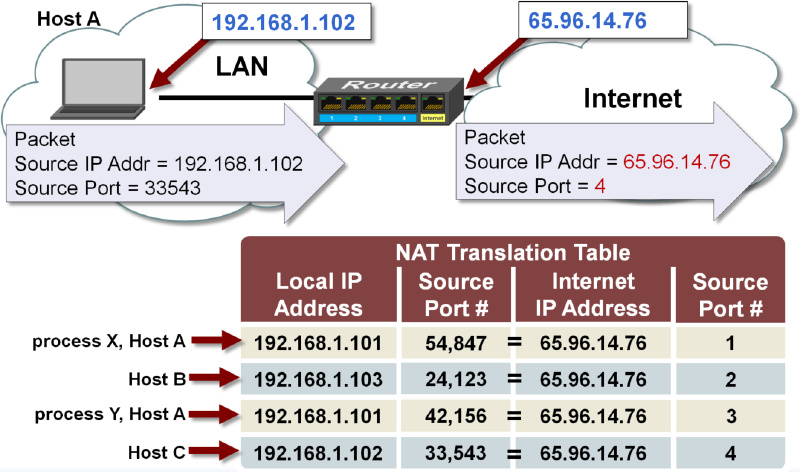
iptables has a built in support for NAT, and it’s configured using the MASQUERADE target.
iptables -t nat -A POSTROUTING -s $CLIENT_IP -j MASQUERADEWith this problem resolved routing response traffic back to the tunnel is again the same as on the client subsystem. We already have a route to the TUN interface and we can encapsulate the traffic into an ICMP packet and send it to a tunnel via the socket.
Configuration #
Configurations explained in the last to subsections are defined as a bash script separate for client and server configurations. When the software is started, depending on a mode flag which determines in which mode (client or server) it’s running the right configuration script will be executed. At the end of execution, the cleanup script will revert all changes made to the system.
Demonstration #
To demonstrate how this software works, I’ll first introduce the network configuration, then I’ll try to access the internet from the PC which has its traffic restricted without and then with my software enabled.
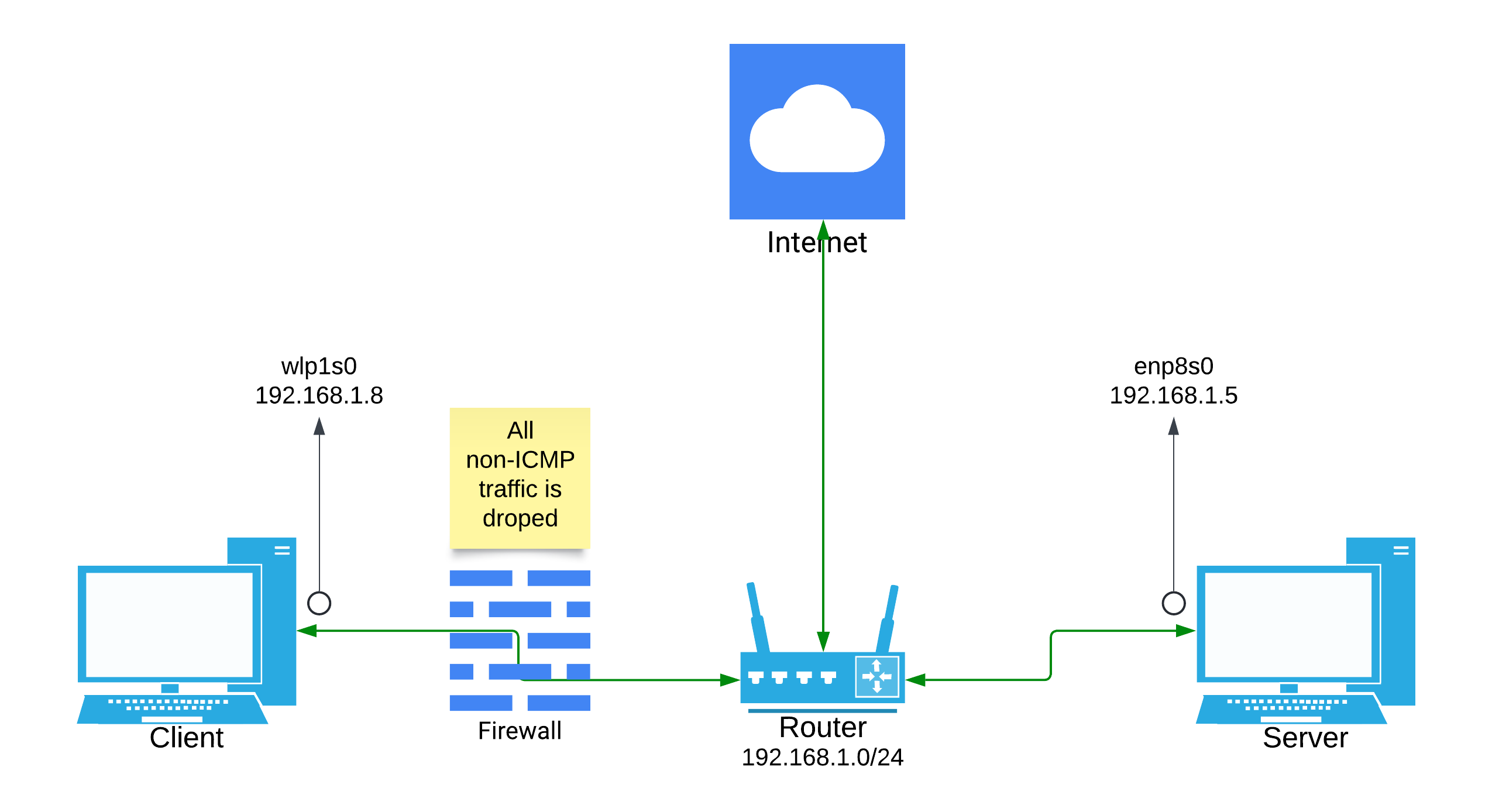
In the image above, I have described a simple network configuration that you can set yourself up at your home as well. The client PC is restricted by the firewall between its router. I’ve simulated the firewall by adding some simple iptables rules on the client PC which block all non-ICMP traffic to the client with one exception, that being DNS queries. Since the router in this setup is resolving DNS queries, I allowed the queries from the client to make the setup less complicated.
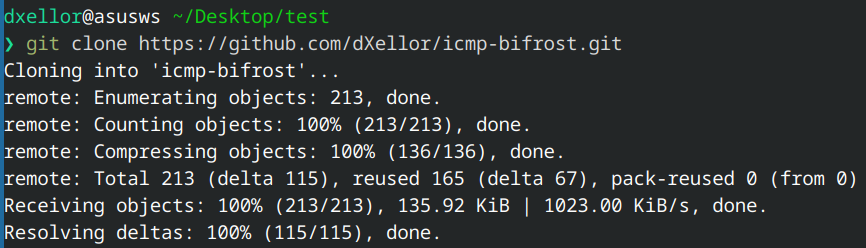
For the test, I’ll be running a simple git command to clone the repository of this project to my PC. As I said, the first run is without the software and it results in failure as you might have guessed.

If we inspect the traffic on the client PC using Wireshark we get something like this:
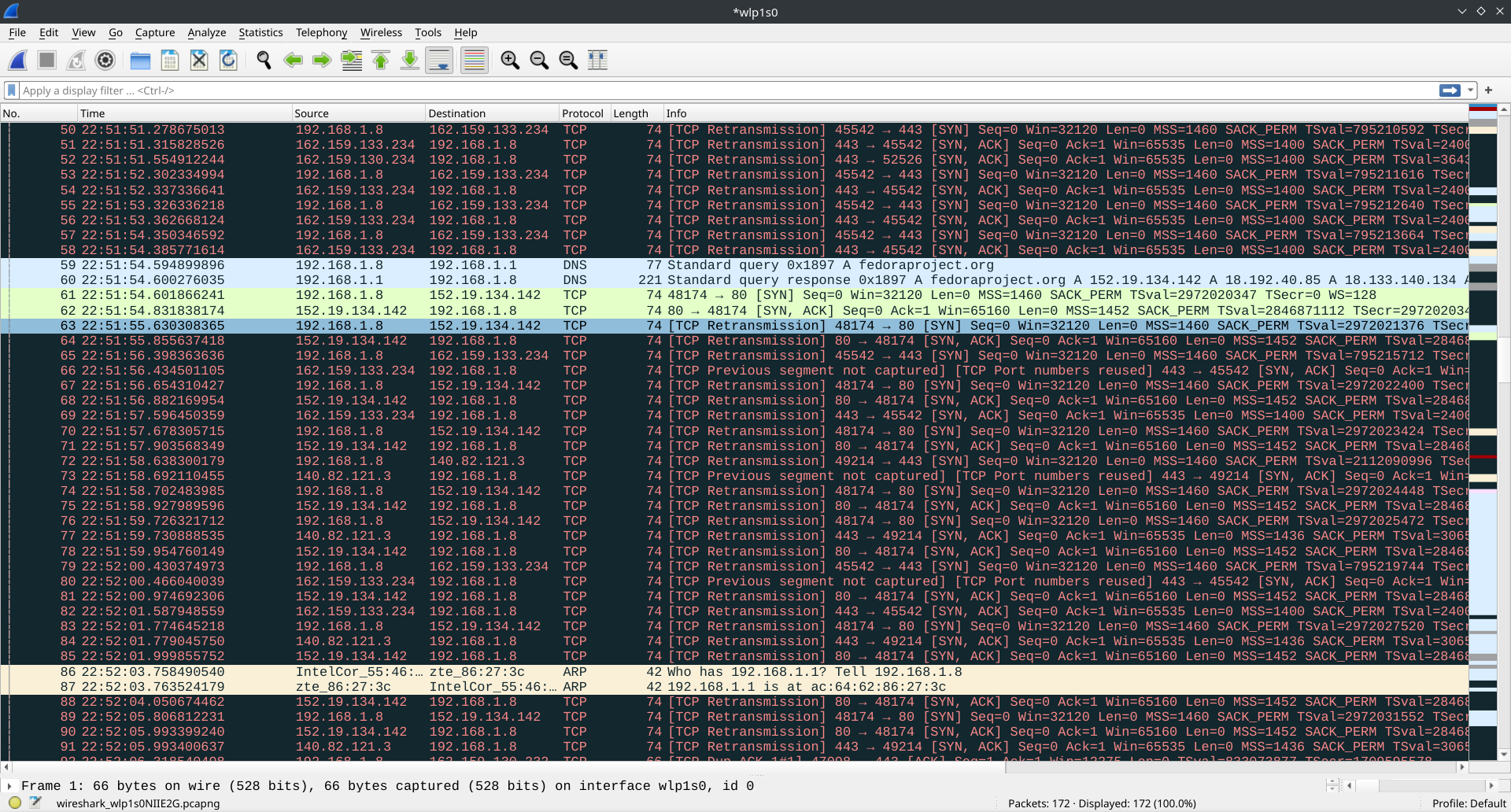
We can see a lot of TCP Retransmission segments. Since the firewall doesn’t block outbound TCP traffic, the client is able to start the TCP handshake process by sending the TCP segment with the SYN flag. Now the firewall blocks the response from the destination which triggers TCP retransmission on the client which hasn’t got the response from the server, so it sends the SYN segment again… and again…
Now, if we enable our software on the client and server side, we get a successful test.
If we inspect the traffic on the client PC using Wireshark we can see a lot of ICMP packets:
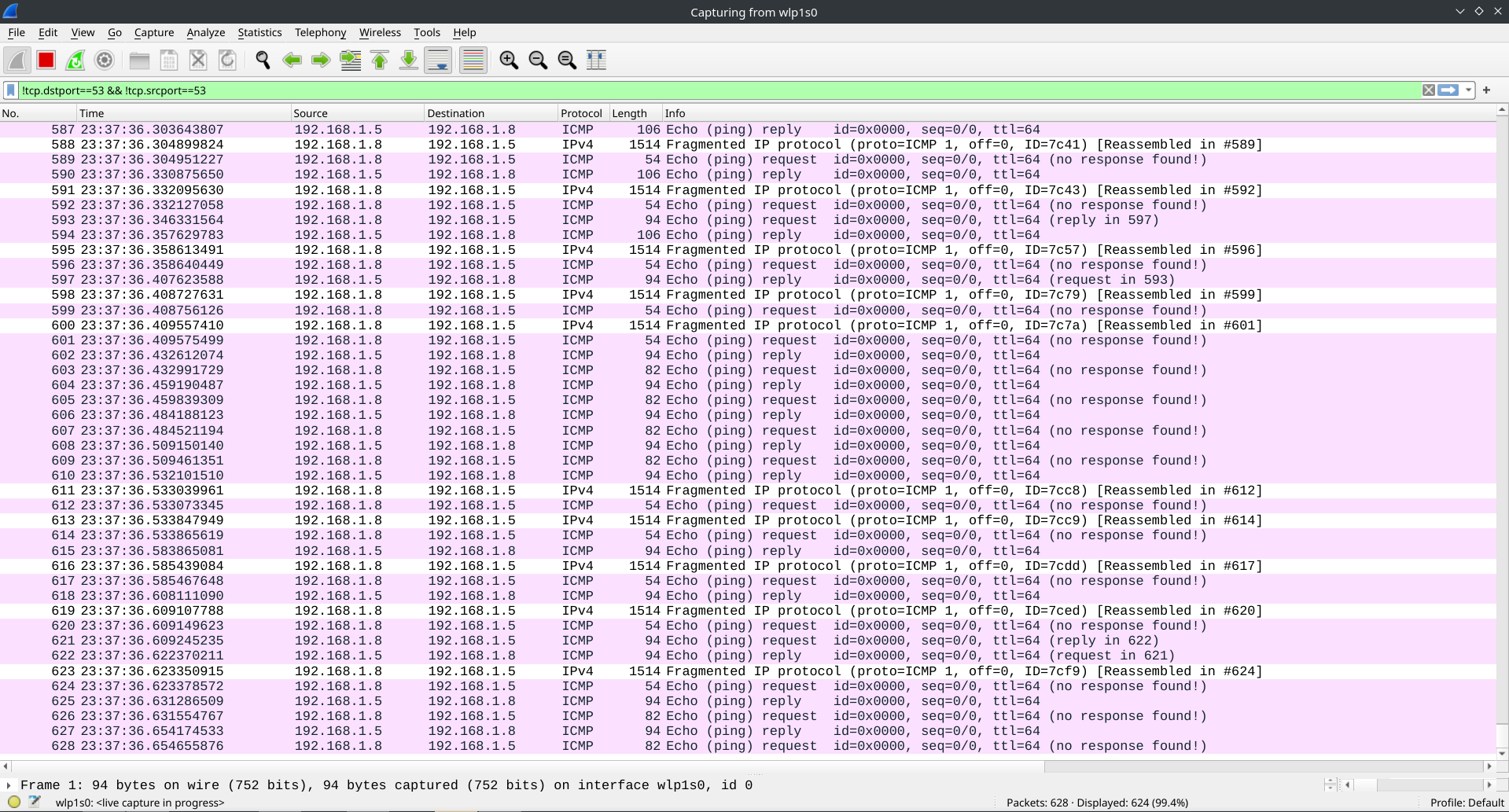
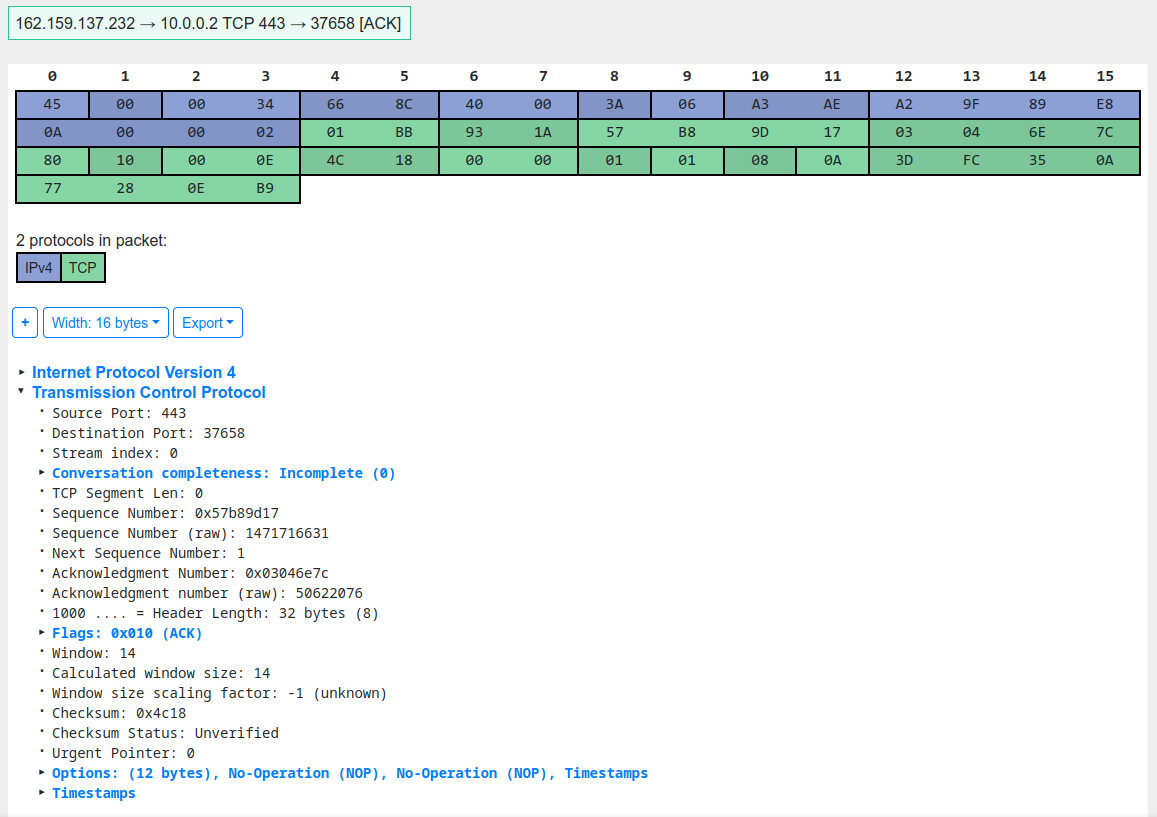
Because of the size of the ICMP packets with embedded client PC traffic, we can see IP segmentation happening on some of the packets. Also, if you take a closer look, you will notice that all of the ECHO (or outbound) ICMP packets have a mark which says: no response found. For an ICMP echo request to be successful, the Data segment of the packet has to be the same on both ECHO and ECHO REPLY packets. In the newer versions of firewall software, this traffic is configured to be dropped, as it’s an ECHO REPLY to an ECHO not sent from the said system. Looking into the data segment of one of the ICMP packets and decoding it with the use of this cool online tool we can see that the embedded data is a TCP ACK segment.
Conclusion #
Newer and more advanced firewalls are more capable of protecting your network infrastructure from this kind of attacks, but doing a project like this one can teach you a lot of computer networking and operating system concepts so I highly recommend you try something like this. If you want to check out my solution you can find it here:
References #
- ICMP specification: https://datatracker.ietf.org/doc/html/rfc792
- Netfilter project: https://netfilter.org/
- Iptables packet flow: https://rakhesh.com/linux-bsd/iptables-packet-flow-and-various-others-bits-and-bobs/
- Netfilter hooks: https://wiki.nftables.org/wiki-nftables/index.php/Netfilter_hooks
- NAT: https://www.cisco.com/c/en/us/products/routers/network-address-translation.html