

Why alternatives? #
Chances are that the first container related technology you have heard of is Docker, and for a good reason. It’s a well established platform for working with container workloads with a developer friendly interface and at the same time very robust functionalities. Besides that, Docker as an organization was one of the creators of the OCI, project that defines important standards for container technologies.
So… Why would you look at the alternatives?
Well, let’s be real, Docker is not going anywhere for now, BUT I think is beneficial to have some knowledge of different technologies as those might better fit some use-cases you encounter. Besides that, in my opinion, some points of discussion can be made about Docker’s architecture which is based on a daemon process that by default runs with root privileges.
Docker licensing #
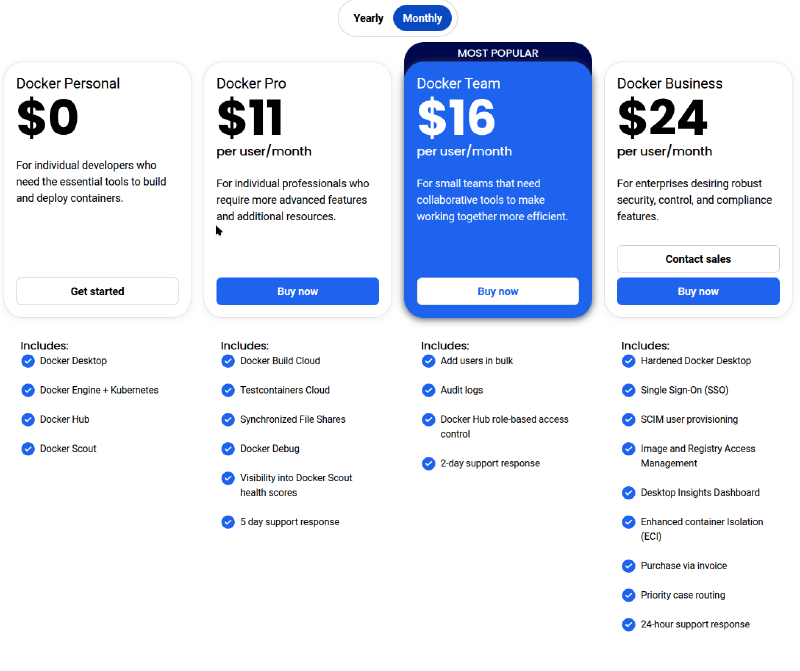
While Docker engine, the heart of Docker itself is open source and free to use you can find some discussions online about the licensing/pricing of the Docker platform itself. I took some time to do some research and I actually find pricing fair. As I said, those subscription plans include some additional features regarding the ecosystem itself like Docker Hub and Docker Desktop. You can easily use alternatives for those platform offerings as well, so you are not really locked into the ecosystem which I appreciate.
Docker architecture #
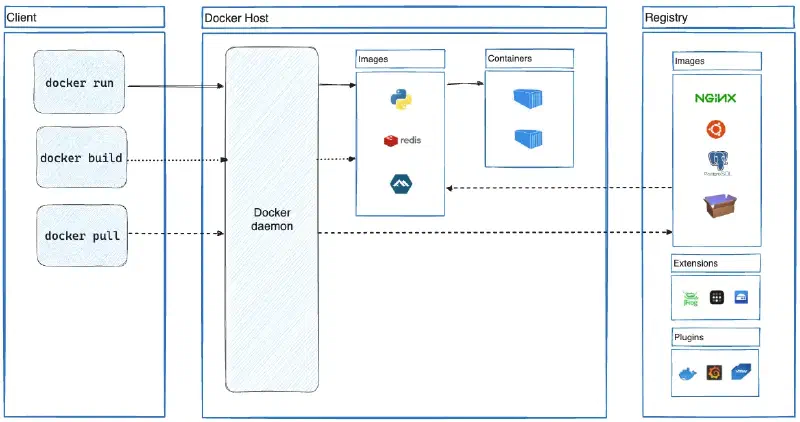
Here is the architecture diagram from the official Docker documentation. From here we can see that we have a standard client-server architecture between Docker Client and Docker daemon. Docker daemon listens for Docker API requests and manages Docker objects using containerd as its underlying core. What’s great about this architecture is that you don’t have to have Docker Client on a host machine that is running dockerd.
Now, the trick about dockerd is that, by default it’s running with root privileges and that makes it a target of threat actors. Besides, the default way of running Docker containers is running them as the root user. Even if not at all trivial, if a threat actor is able to escape the container isolation they’ll have root user access to the host.
These security risks can be mitigated by using Rootless mode which has some prerequisites and limitations but is way more secure than the default configuration.
Podman #
Podman is a tool for managing and running OCI compliant containers, developed by Red Hat. It comes with the CLI that is going to be very familiar to anyone who has used Docker CLI. There is a running joke in the community that you can just create an alias docker=podman and run Podman just like you would Docker. Additional features for building and manipulating container images are wrapped into Buildah and Scopeo software tools. GUI software is also available with Podman Desktop.
Podman Architecture #
In contrast to Docker, Podman’s architecture is daemonless. To be more specific, when executing the Podman command to run a container, Podman will use what is called a fork/exec model, meaning the container process is a child forked from the Podman process. Therefore container process loginuid (id of the process owner) will be the uid of a user who executed the command, allowing for rootless containers. One of the multiple benefits of this approach is also auditing, as the container process can be traced to the user who started it.
Podman containers can be easily integrated with the systemd Linux init system. This makes running containers as services a few steps process. Porting multi-service apps that were hosted on VMs to containers can also be done by integrating systemd into a container. Of course, the recommendation for that case would still be to separate those services into multiple containers, but you might lack resources to achieve that so you have this alternative.
Similar to Kubernetes pods, Podman can create pods which are groups of containers that share resources. Each pod runs an infra container by default that serves as a controller for other containers inside the pod. These pods allow developers to create Kubernetes like environments for local development and can also be exported as a K8 YAML file.
Finally, Podman has support for a RESTful API which allows users to run podman commands from remote clients.
Using Podman #
As a simple example, I’ll run nginx web server container with test HTML page using Podman:
mkdir /tmp/test-web
echo "<h1>Test</h1>" > /tmp/test-web/index.html

podman run -d -p 8080:80 -v /tmp/test-web:/usr/share/nginx/html:Z docker.io/library/nginx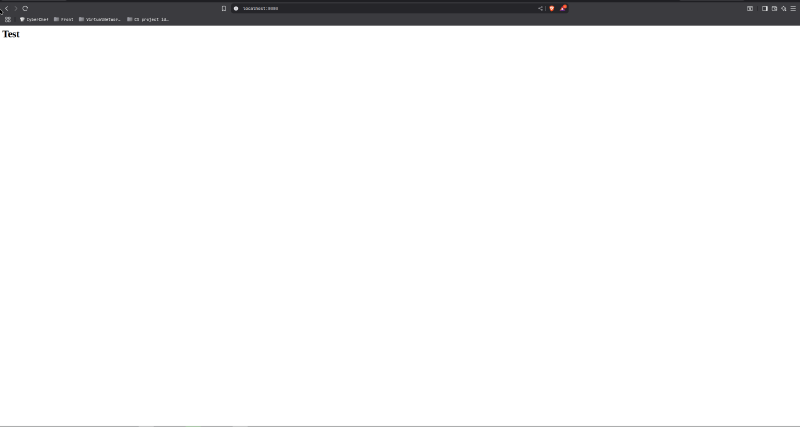
There are three main things worth noticing:
- Unlike Docker, Podman does not create a volume directory by default. This is by design.
:Zadded at the end of a volume bind is a tag that enables the container to write to the desired directory without SELinux interrupting it. This has to be done for Docker containers as well if you have SELinux enabled on your system.- The image is referenced as a full URL because Podman has a few default image repositories. If not stated, you’ll be prompted to select the image from desired the supplier.
If you would to run a container inside a pod, you would first create a pod and then run a container inside it, like this:
podman pod create --name pod-web --infra --publish 8080:80
podman run -d -v /tmp/test-web:/usr/share/nginx/html:Z docker.io/library/nginx
Podman limitations #
- Podman does not support Windows containers
- Even though Docker ready images are OCI compatible, you can run into issues of running some of those using Podman
- Podman’s
podman composeis a script written in Python which traditionally had some issues, unlike Docker’s built indocker compose. - Podman is not compatible with Docker Swarm
- Podman ecosystem is not as robust as Dockers
Conclusion #
Recently I have seen more people talking about Podman so it’s definitely worth taking a look into. Who knows, it might even suit some of your use-cases better than Docker.
References #
- What is Docker: https://docs.docker.com/get-started/docker-overview/
- What is Podman: https://www.redhat.com/en/topics/containers/what-is-podman
- Understanding rootless Podman’s user namespace modes: https://www.redhat.com/en/blog/rootless-podman-user-namespace-modes
- Podman volumes and SELinux: https://blog.christophersmart.com/2021/01/31/podman-volumes-and-selinux/
- Migrating from Docker: https://podman-desktop.io/docs/migrating-from-docker/importing-saved-containers