
Introduction #
Recently, my colleague Luka and I started our journey of learning about Kubernetes. Both of us had some basic knowledge and no real experience so we decided the first thing we should do would be to create a real K8S cluster that we can use for practice. There are alternatives to this approach, mainly setting up a local environment (You can check a guide here), but in addition to a local environment not being great for collaborative learning, we wanted to get as close as possible to a production grade setup, excluding managed services like EKS or AKS.
In the beginning we used the Cloud Guru subscription, that allowed us to create some VMs and resources in the Azure environment that last for 4 hours which was plenty of time for our learning sessions. After a couple of sessions we realized that provisioning infrastructure resources and configuring the cluster with our bash scripts manually was tedious and time consuming, so with me being more interested in DevOps, we decided I should automate it.
Infrastructure #
For the most basic setup, we need two nodes (VMs) that can communicate with each other. We decided to go with the cloud route, since it will bring us some benefits in the future, mostly with setting up custom domains and load balancers, and also because my homelab currently has no available resources for such feat :D. AWS was the platform of choice, but I strongly advise people to experiment since we are not utilizing anything that other platforms do not provide. If you are looking for the best price to performance Hetzner cost optimized VPS is my recommendation.
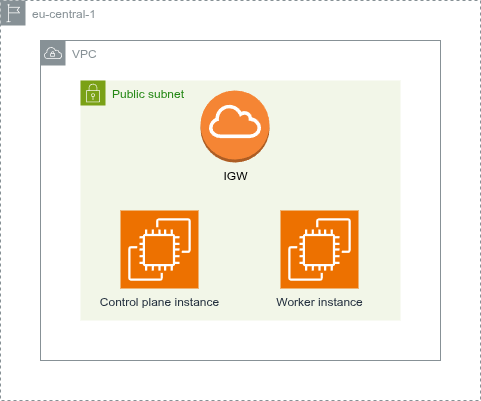
I went for the t3a.xlarge type for both EC2 instances that comes with 4 vCPUs and 16GB of RAM. To be honest, after some testing, our practice cluster never had more than 25% of its resources consumed so I advise going with cheaper instance types. I believe 2 vCPUs and 8GB of RAM is enough for a project like this one and you can always scale it up or down depending on your needs. Since that instance type does not come with default storage, both instances have a 15GB EBS volume attached to them. Also for now, we didn’t want to complicate networking so we have only one public facing subnet.
Automation #
For the automation part, the IaC tool of choice was Terraform. No particular reason other than that it’s the most popular and widely used in the industry. For now the whole setup can be placed in just a few files, but I’ll surely have to refactor it later to use modules.
Directory structure
infra/
├─ providers.tf # Defines terraform and provider requirements
├─ outputs.tf # Defines public IPs of the instances as outputs
├─ network.tf # Defines network resources
├─ nodes.tf # Defines EC2 resources
├─ security.tf # Defines Security groups and rules
network.tf
resource "aws_vpc" "k8s_practice" {
  cidr_block = "10.0.0.0/16"
  tags = {
    Name = "k8s_practice"
  }
}

resource "aws_subnet" "public" {
  vpc_id     = aws_vpc.k8s_practice.id
  cidr_block = "10.0.0.0/24"
  tags = {
    Name = "public"
  }
}

resource "aws_internet_gateway" "portal" {
  vpc_id = aws_vpc.k8s_practice.id
  tags = {
    Name = "portal"
  }
}

resource "aws_route_table" "public" {
  vpc_id = aws_vpc.k8s_practice.id
  route {
    cidr_block = "0.0.0.0/0"
    gateway_id = aws_internet_gateway.portal.id
  }
}

resource "aws_route_table_association" "public" {
  subnet_id      = aws_subnet.public.id
  route_table_id = aws_route_table.public.id
}
nodes.tf
data "aws_ami" "k8s_node" {
  most_recent = true
  owners      = ["136693071363"] # Official Debian account

  filter {
    name   = "name"
    values = ["debian-13-amd64*"] #https://wiki.debian.org/Cloud/AmazonEC2Image/Trixie
  }
}

resource "aws_instance" "control_1" {
  ami                         = data.aws_ami.k8s_node.id
  instance_type               = "t3a.xlarge"
  associate_public_ip_address = true
  subnet_id                   = aws_subnet.public.id
  vpc_security_group_ids      = [aws_security_group.k8s_node.id]
  root_block_device {
    delete_on_termination = true
    volume_size           = 15
    volume_type           = "gp3"
  }
  key_name = "dxkp"
  tags = {
    Name    = "control_1"
    K8SType = "control"
  }
}

resource "aws_instance" "worker_1" {
  ami                         = data.aws_ami.k8s_node.id
  instance_type               = "t3a.xlarge"
  associate_public_ip_address = true
  subnet_id                   = aws_subnet.public.id
  vpc_security_group_ids      = [aws_security_group.k8s_node.id]
  root_block_device {
    delete_on_termination = true
    volume_size           = 15
    volume_type           = "gp3"
  }
  key_name = "dxkp"
  tags = {
    Name    = "worker_1"
    K8SType = "worker"
  }
}
security.tf
resource "aws_security_group" "k8s_node" {
  description = "Security group for all k8s nodes"
  name        = "sg_k8s_node"
  vpc_id      = aws_vpc.k8s_practice.id
}

resource "aws_vpc_security_group_ingress_rule" "allow_ssh" {
  security_group_id = aws_security_group.k8s_node.id
  description       = "Allow SSH ingress from anywhere"
  cidr_ipv4         = "0.0.0.0/0"
  from_port         = "22"
  to_port           = "22"
  ip_protocol       = "tcp"
}

resource "aws_vpc_security_group_ingress_rule" "allow_node_communication" {
  security_group_id            = aws_security_group.k8s_node.id
  description                  = "Allow K8S node communication"
  referenced_security_group_id = aws_security_group.k8s_node.id
  from_port                    = "-1"
  to_port                      = "-1"
  ip_protocol                  = "-1"
}

resource "aws_vpc_security_group_egress_rule" "allow_any" {
  security_group_id = aws_security_group.k8s_node.id
  description       = "Allow all egress traffic"
  cidr_ipv4         = "0.0.0.0/0"
  from_port         = "-1"
  to_port           = "-1"
  ip_protocol       = "-1"
}
It’s worth noting that we allow SSH access to all of our nodes only because we still connect and work on them, but the goal is that none of those have public SSH access. One cool trick to use is to define default tags inside the AWS provider block. That will tag all of the provisioned resources with those tags, in our case: ManagedBy=Terraform and Project=k8s_practice.
In addition to this simple terraform setup, I created two Github Action workflows that we can use to deploy and destroy the infrastructure in one click. For additional security and cost optimization “Destroy Infrastructure” workflow is run every midnight in case we forgot to destroy the infra ourselves.
I plan on further expanding the infrastructure with AWS Auto-Scaling Groups that will help simulate scaling of the cluster itself under load.
Cluster Configuration #
For the cluster setup, initially we created a pair of bash scripts containing the necessary steps to set up the cluster, one for the control plane and one for the worker node. Thanks to the Official kubernetes documentation we haven’t had much issues with it. It turned out that even the couple of obstacles we encountered were there because we haven’t followed the guide thoroughly :D. Initially we started with an Ubuntu server images, but later decided to continue with Debian as it does not use snap and because it has a smaller memory footprint.
Automation #
Again, I needed a tool for configuration management, and I again choose the most widely used in the industry - Ansible. Unlike Terraform, this was not that simple a choice, as there is a lot of good configuration management software available right now, though ultimately agentless approach of Ansible is why I went with it. Since we already had bash scripts written, I just needed to adjust those steps and write them in an Ansible way. One small challenge was making a dynamic inventory to accommodate our procedure of often destroying and creating instances without having static IPs assigned to the instances. For that I used AWS Dynamic inventory plugin
plugin: amazon.aws.aws_ec2
regions:
  - eu-central-1

cache: true
cache_plugin: jsonfile
cache_timeout: 300
cache_connection: /tmp/ansible_aws_ec2_cache

hostnames:
  - ip-address

filters:
  instance-state-name: running
  tag:Project: k8s_practice

compose:
  aws_tags: tags

keyed_groups:
  - key: tags.ManagedBy
    prefix: managed_by
    separator: "_"
  - key: tags.K8SType
    prefix: k8s_node_type
    separator: "_"
Crucial line here is a group defined by a resource tag K8SType. We use this group to separate Ansible roles (sets of tasks) for the Control plane nodes and for the worker nodes.
Directory structure
config/
├── ansible.cfg
├── README.md
├── requirements.txt
├── requirements.yaml
├── inventory/
│   └── aws_ec2.yaml
├── playbooks/
│   └── site.yaml
└── roles/
    ├── addons/
    │   ├── files/
    │   │   └── argocd-values.yaml
    │   └── tasks/
    │       ├── 01-argocd.yaml
    │       └── main.yaml
    ├── common/
    │   ├── files/
    │   │   └── containerd-config.toml
    │   ├── handlers/
    │   │   └── main.yaml
    │   └── tasks/
    │       ├── 01-system_setup.yaml
    │       ├── 02-common_packages.yaml
    │       ├── 03-containerd.yaml
    │       ├── 04-kubernetes_dependencies.yaml
    │       └── main.yaml
    ├── control_plane/
    │   ├── files/
    │   │   └── k8s-cluster-config.yaml
    │   └── tasks/
    │       ├── 01-kubernetes_cluster.yaml
    │       ├── 02-kubernetes_qol.yaml
    │       ├── 03-kubernetes_networking.yaml
    │       ├── 04-helm.yaml
    │       └── main.yaml
    └── worker/
        └── tasks/
            └── main.yaml
Admittedly, this setup looks a bit complicated, but I assure you, if you have a solid understanding of Linux and Bash it’s pretty easy to understand. Under the site.yaml playbook we have defined 4 roles:
- common - Runs on all nodes, sets up the system, common packages and kubernetes dependencies
- control_plane - Runs on control plane nodes, initializes K8S cluster, sets up some bash aliases for the admin users, sets up Flannel as CNI and installs Helm
- worker - Runs on worker nodes, joins worker nodes to the cluster
- addons - Runs on control plane nodes, installs ArgoCD
Not to clutter this post with thousand more files and for the sake of keeping my cluster definition private I won’t be sharing my Ansible setup here, but If you are interested, be sure to contact me over email or LinkedIn. This playbook is set to run on a successful infrastructure deployment utilizing the workflow_run trigger inside Github Actions.
Price (As of April 2026) #
I’ll start with assumption that both me and Luka spend 10 hours (probably a bit overestimated) a week working on this project with the cluster deployed. Here are the numbers for a monthly basis:
AWS [~40 hrs/month]
| Resource | Qty | Unit Price | Monthly Usage | Monthly Cost |
|---|---|---|---|---|
| t3a.xlarge (control plane) | 1 | $0.1728/hr | ~40 hrs | $6.91 |
| t3a.xlarge (worker node) | 1 | $0.1728/hr | ~40 hrs | $6.91 |
| EBS gp3 15GB (per node) | 2 | $0.08/GB-month | ~40 hrs (prorated) | $0.13 |
| Total | ~$13.95/month |
As I mentioned, a cheaper instance type like
t3a.large($0.0864/hr) would still be sufficient and cut the cost roughly in half - down to ~$7.05/month total.
Not that far off from Netflix subscription price depending on where you live :D. But If you think this is low for a fancy cluster setup like this, take a look at the Hetzner alternative I mentioned before:
Hetzner [~40 hrs/month]
| Resource | Qty | Unit Price | Monthly Usage | Monthly Cost |
|---|---|---|---|---|
| CX43 (control plane) | 1 | $0.0224/hr | ~40 hrs | $0.90 |
| CX43 (worker node) | 1 | $0.0224/hr | ~40 hrs | $0.90 |
| Total | ~$1.79/month |
Now, looking at this, Hetzner seems as a no brainer (and trust me, it is in so many cases), but I decided still to go with the AWS setup (with the smaller t3a.large instance type) since it offers some services that Hetzner does not, like private container repository with ECR, and managed K8S solution that I want to test as this project progresses. But who knows, I might set up some of those services in my homelab and ditch AWS? I’ll make sure to document that in a blog as well :D
Conclusion #
With just a couple of USD a month you can have a fully automated, version-controlled production like Kubernetes cluster setup without a managed service. I enjoyed working on this one and I highly recommend people who are starting with Kubernetes to try a project like this one as there is no better way of learning Kubernetes and DevOps in general than working on a real cluster and infrastructure.
References #
- Kubernetes documentation: https://kubernetes.io/docs/home/
- Terraform documentation: https://developer.hashicorp.com/terraform/docs
- EC2 instance type On demand pricing: https://aws.amazon.com/ec2/pricing/on-demand/
- Hetzner VPS: https://www.hetzner.com/cloud/
- Github actions documentation: https://docs.github.com/en/actions
- Ansible documentation: https://docs.ansible.com/